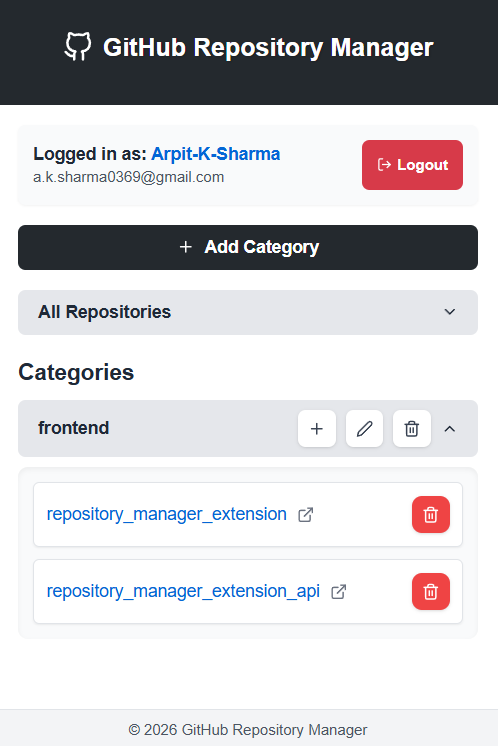
Github Repo Manager Web Extension
Browser-based developer tool for managing GitHub repositories directly without leaving the page.
Tech Stack
Languages
 Javascript
Database Design
 MongoDB
Tools and Workflow
 Git
Git GitHub
 Postman
Web Development
 React.js
 Express.js
 Node.js
 Tailwind
🚀 Overview
Repository Manager Extension is a full-stack browser extension that brings GitHub repository management directly into your browser. Instead of jumping between tabs and GitHub's interface, developers can view, organize, and manage their repositories from a simple extension dashboard. The project consists of a frontend extension UI and a backend API that handles repository operations and data management.
✨ Key Features
- Browser Extension UI: Clean dashboard displaying your repositories with quick actions.
- Direct Repo Management: View, search, and organize repositories without leaving your browser.
- Backend API: Node.js/JavaScript API that handles GitHub integration and data operations.
- GitHub Integration: Connects to GitHub API to fetch and manage repository information.
- Quick Access: Faster than navigating GitHub's web interface for common tasks.
- Persistent Storage: Remembers your preferences and repository organization settings.
💡 Technical Challenges
-
Challenge: "Building communication between browser extension frontend and backend API with proper authentication."
-
Solution: "Implemented secure API endpoints with token-based authentication, allowing the extension to safely interact with the backend."
-
Challenge: "Handling GitHub API rate limits and managing API calls efficiently from both frontend and backend."
-
Solution: "Built caching mechanisms in the backend API to reduce redundant GitHub API calls and prevent hitting rate limits."
-
Challenge: "Keeping the extension lightweight and responsive while displaying real-time repository data."
-
Solution: "Optimized the frontend to load only essential data on startup, with lazy loading for additional repository details."
-
Challenge: "Synchronizing state between extension UI and backend API across browser sessions."
-
Solution: "Used persistent storage in the extension combined with sync endpoints in the API to maintain consistency."
📈 Outcome / Lessons Learned
- "Built a complete full-stack project from frontend extension UI to backend API architecture."
- "Learned how browser extensions communicate with external APIs and handle authentication securely."
- "Gained experience in building tools that solve real developer problems (GitHub workflow optimization)."
- "Understood the challenges of managing API rate limits and caching in production systems."
- "Delivered a practical tool that improves developer productivity for GitHub users."